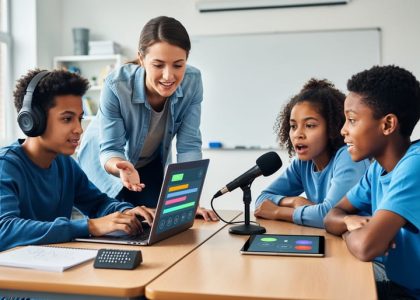
Transform your classroom into a dynamic collaboration hub by embracing digital tools that break down traditional learning barriers. Today’s educators have unprecedented opportunities to foster meaningful student interactions, whether in physical classrooms or virtual environments. As technology reshapes education, strategic collaboration becomes not just a teaching method, but a fundamental skill preparing students for their future careers.
Effective collaboration in modern education extends far beyond simple group work. It encompasses real-time document sharing, virtual whiteboarding, cross-cultural project partnerships, and synchronous learning experiences that connect students across distances. Research shows that students who regularly engage in collaborative learning demonstrate improved critical thinking, enhanced communication skills, and deeper subject matter understanding.
The challenge lies not in finding collaboration tools—they’re abundant—but in implementing them thoughtfully to create authentic learning experiences. Successful collaborative learning environments require careful planning, clear expectations, and the right balance of structure and creative freedom. By mastering digital collaboration strategies, educators can create inclusive learning spaces where every student’s voice matters and collective knowledge building flourishes.
This fundamental shift in educational practice aligns perfectly with both current pedagogical research and workplace demands, making enhanced collaboration an essential focus for forward-thinking educators.
Why Digital Collaboration Matters in Today’s Classroom

Meeting Modern Learning Needs
Today’s students are digital natives who have grown up in a connected world, making digital collaboration not just an option but an essential part of their learning experience. These learners expect interactive, engaging experiences that mirror their daily interactions with technology. By incorporating digital collaboration tools, educators can create learning environments that resonate with students’ natural communication preferences while preparing them for future academic and professional success.
Modern learning needs emphasize flexibility, accessibility, and personalized experiences. Digital collaboration tools address these needs by allowing students to work together across different times and locations, accommodating various learning styles and paces. Whether through shared documents, virtual whiteboards, or discussion platforms, these tools enable students to contribute in ways that feel natural and comfortable to them.
Additionally, digital collaboration aligns with emerging educational trends such as project-based learning, flipped classrooms, and social-emotional learning. These approaches benefit from the interactive and cooperative nature of digital tools, which facilitate meaningful peer interactions and foster critical thinking skills. By embracing these collaborative technologies, educators can create inclusive learning spaces that support diverse learning needs while building essential 21st-century skills.
Breaking Down Traditional Barriers
Digital tools are revolutionizing how we overcome traditional barriers to collaboration in education. Geographic distance, scheduling conflicts, and limited physical resources no longer need to restrict student and teacher interactions. Through virtual meeting spaces and shared digital workspaces, educators can now connect their classrooms with peers across the hall or across the globe.
Cloud-based platforms enable real-time document sharing and editing, allowing students to work together seamlessly regardless of their location. This accessibility particularly benefits students who may struggle with in-person collaboration due to social anxiety or physical limitations. Translation features built into many digital tools also help break down language barriers, creating more inclusive learning environments.
Time constraints are addressed through asynchronous collaboration options, where students can contribute to group projects at their own pace. Digital bulletin boards and discussion forums maintain continuous engagement while accommodating different schedules. Resource limitations are also minimized, as digital tools often provide free or low-cost alternatives to expensive physical materials.
For teachers, these tools facilitate professional learning communities and mentorship opportunities that weren’t previously possible due to logistical challenges.
Essential Digital Tools for Classroom Collaboration

Real-Time Document Sharing Platforms
Real-time document sharing platforms have revolutionized how educators and students collaborate on projects and assignments. These innovative online teaching tools allow multiple users to work on the same document simultaneously, making group work and peer review processes more efficient and engaging.
Popular platforms like Google Docs, Microsoft OneDrive, and Padlet offer user-friendly interfaces that students can quickly master. Teachers can observe student progress in real-time, provide immediate feedback, and guide collaborative writing activities. These platforms also maintain a revision history, allowing educators to track individual contributions and student growth over time.
When implementing real-time document sharing in your classroom, consider starting with simple collaborative activities like group brainstorming or peer editing sessions. As students become more comfortable with the technology, you can introduce more complex projects such as collaborative story writing or group research papers.
Key benefits include:
– Seamless sharing and accessibility from any device
– Built-in commenting and suggestion features
– Automatic saving to prevent work loss
– Easy organization of student work in shared folders
– Integration with other educational apps and platforms
Remember to establish clear guidelines for document sharing and collaboration etiquette to ensure productive and respectful online interactions among students.
Virtual Discussion Spaces
Digital discussion spaces have transformed how students interact and collaborate in modern classrooms. These platforms create inclusive environments where every student has a voice, enabling meaningful dialogue and shared learning experiences through virtual learning communities. Tools like discussion boards, chat rooms, and collaborative workspaces allow students to engage in thoughtful conversations, share resources, and work together on projects regardless of physical location.
These digital spaces offer several advantages over traditional classroom discussions. Students who may be hesitant to speak up in person often feel more comfortable sharing their thoughts online. The asynchronous nature of many platforms gives students time to reflect and compose thoughtful responses, leading to deeper engagement with the material. Additionally, these spaces create permanent records of discussions, allowing students and teachers to revisit conversations and track the development of ideas over time.
To maximize the effectiveness of virtual discussion spaces, educators should establish clear guidelines for participation, provide structured prompts that encourage critical thinking, and actively moderate conversations to ensure they remain productive and respectful. Regular feedback and acknowledgment of student contributions help maintain engagement and create a supportive learning environment where all voices are valued and heard.
Project Management Tools for Education
Project management tools have revolutionized how educators organize and track group work, making collaboration more efficient and engaging for students. Popular platforms like Trello, Google Classroom, and Microsoft Teams offer intuitive interfaces that help structure group projects while teaching valuable organizational skills.
Trello’s visual board system allows teachers to create project timelines with clear milestones and task assignments. Students can move cards across different stages, from “To Do” to “Complete,” providing a clear overview of project progress. This visual approach helps students develop time management skills while keeping everyone accountable.
Google Classroom integrates seamlessly with other Google tools, making it easier to share documents, track submissions, and provide feedback. The platform’s assignment features let teachers create structured project workflows, set due dates, and monitor individual contributions to group work.
For more complex projects, Microsoft Teams offers comprehensive project management capabilities, including file sharing, chat functions, and video conferencing. Its built-in calendar and task management features help students stay organized and meet deadlines effectively.
When selecting a project management tool, consider your students’ age group, technical abilities, and project complexity. Start with simple tools and gradually introduce more advanced features as students become comfortable with digital collaboration. Remember to provide clear instructions and dedicated time for students to learn the tools, ensuring they can focus on the project content rather than struggling with technology.
Implementation Strategies for Success
Getting Started with Digital Tools
Introducing digital collaboration tools into your classroom doesn’t have to be overwhelming. Start with a thoughtful, step-by-step approach that prioritizes both teacher comfort and student success. Begin by selecting one tool that aligns with your immediate teaching goals – whether it’s a shared document platform for group writing or a digital whiteboard for math problem-solving.
Before implementing any new tool, take time to familiarize yourself with its basic functions. Many educational platforms offer free tutorials and training resources specifically designed for teachers. Consider partnering with a tech-savvy colleague who can provide support during the initial implementation phase. This peer-to-peer learning approach often leads to more successful smart tech integration in the classroom.
Start small by introducing the tool to a single class or for one specific activity. This allows you to gauge its effectiveness and make necessary adjustments before scaling up. Create clear instructions for students, including step-by-step guides or video tutorials. Consider designating student “tech ambassadors” who can help their peers navigate the new tool.
Monitor student engagement and collect feedback regularly. What’s working well? Where are students struggling? Use this information to refine your approach and address any challenges early on. As comfort levels increase, gradually introduce additional features or new tools that complement your existing digital workflow.
Remember to communicate with parents about these new digital initiatives. Share the educational benefits and provide resources to help them support their children’s use of these tools at home. This partnership between school and home can significantly enhance the success of your digital collaboration efforts.
Building Student Engagement
Creating an engaging collaborative environment starts with building strong student participation. To skyrocket student engagement, educators should implement a mix of digital and traditional strategies that encourage active participation from all learners.
Begin by establishing clear expectations and guidelines for collaboration. Create a classroom charter that outlines participation rules, respectful communication practices, and goals for group work. This foundation helps students understand their roles and responsibilities in collaborative activities.
Incorporate choice and voice by allowing students to select topics or projects that interest them. When students have agency in their learning, they’re more likely to engage meaningfully with their peers. Consider using digital tools like online polls or discussion boards to gather student input and preferences.
Implement structured ice-breakers and team-building activities at the start of collaborative projects. These activities help students feel comfortable working together and build trust within groups. Digital platforms can facilitate these connections through virtual meeting spaces and shared digital workspaces.
Design tasks that require genuine collaboration rather than simply dividing work. Create interdependent activities where success depends on all team members contributing their unique perspectives and skills. This approach encourages active participation and helps students understand the value of working together.
Use positive reinforcement and celebrate collaborative successes. Recognize both individual contributions and team achievements to motivate continued engagement. Digital badges or virtual recognition boards can make these celebrations more visible and meaningful to students.
Remember to provide regular opportunities for reflection and feedback, allowing students to share their experiences and suggest improvements to collaborative processes. This ongoing dialogue helps refine engagement strategies and ensures all students feel heard and valued in the collaborative learning environment.
Measuring Collaboration Success
Measuring the success of collaborative initiatives is essential for continuous improvement and ensuring that digital tools effectively support student learning. Start by establishing clear, measurable objectives for your collaboration projects, such as increased student participation, improved assignment completion rates, or enhanced peer feedback quality.
Consider implementing both quantitative and qualitative assessment methods. Track numerical data like student engagement metrics, including the frequency of contributions, response times, and peer interactions. Digital platforms often provide built-in analytics that can help monitor these patterns over time.
Gather qualitative feedback through student surveys, reflection journals, and group discussions. Ask students about their collaboration experiences, challenges they’ve encountered, and suggestions for improvement. This feedback provides valuable insights into the effectiveness of your chosen tools and strategies.
Create rubrics specifically designed to evaluate collaborative skills, including communication, teamwork, and digital citizenship. These rubrics can help assess both individual contributions and group dynamics, providing a structured way to measure progress.
Document success stories and areas for improvement through regular check-ins and progress monitoring. Consider implementing peer evaluations to give students ownership of the assessment process while developing their ability to provide constructive feedback.
Remember that measuring collaboration success is an ongoing process. Regularly review and adjust your assessment strategies based on collected data and feedback. Share successful practices with colleagues and participate in professional learning communities to exchange ideas and insights about effective collaboration measurement techniques.
Consider creating digital portfolios that showcase student collaborative work and growth over time. These portfolios can serve as powerful evidence of progress and help students reflect on their development as collaborative learners.
As we’ve explored throughout this guide, enhancing collaboration in the K-12 classroom is both an art and a science that requires thoughtful implementation of digital tools and proven strategies. By incorporating collaborative technologies into your teaching practice, you’re not just following a trend – you’re preparing students for their future roles in an increasingly connected world.
Remember that successful collaboration starts with clear goals, careful planning, and a willingness to adapt. Whether you’re using virtual whiteboards for group brainstorming or implementing peer review systems through shared documents, the key is to maintain focus on meaningful student interaction and engagement.
Start small by choosing one or two tools that align with your teaching objectives, and gradually expand your collaborative toolkit as you and your students become more comfortable. Don’t forget to leverage your professional learning community for support and ideas – other educators are often your best resource for practical implementation tips.
Most importantly, celebrate the small victories as your students develop essential collaboration skills. Their growing ability to work together effectively, both in person and digitally, is preparing them for success in school and beyond.