
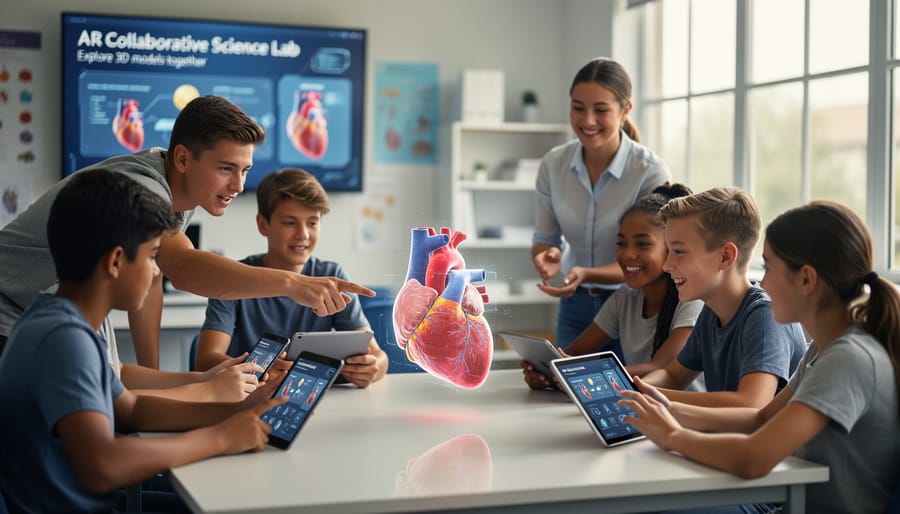
Transform your classroom into an interactive learning environment by downloading AR apps like Google Expeditions or Merge EDU that overlay 3D models directly onto students’ devices, allowing them to explore the human heart, ancient civilizations, or molecular structures without leaving their desks. Start with free trials of subject-specific apps such as GeoGebra AR for mathematics or Froggipedia for life sciences to test whether the technology engages your particular students before committing resources. Prepare your classroom by ensuring reliable WiFi connectivity and determining whether you’ll use student smartphones, school tablets, or shared device rotations based on your available technology infrastructure.
Augmented reality apps bridge the gap between abstract concepts and tangible understanding, particularly for visual and kinesthetic learners who struggle with traditional textbook approaches. When students manipulate a 3D solar system with their hands or walk around a virtual dinosaur skeleton, they’re not just observing information but actively constructing knowledge through spatial reasoning and experiential learning. Research shows these immersive experiences increase retention rates and spark genuine curiosity, especially among students who previously felt disconnected from academic content.
The technology isn’t without challenges. Initial setup requires time investment, some students may experience device-related distractions, and not all apps align perfectly with curriculum standards. Yet thousands of educators successfully integrate AR by starting small with one unit or lesson, gradually building confidence and discovering which applications truly enhance their teaching objectives rather than simply adding novelty. The question isn’t whether AR belongs in education, but rather which apps serve your students’ specific learning needs most effectively.
What Makes Educational AR Apps Different from Regular Apps
Educational AR apps fundamentally differ from standard digital tools by overlaying interactive digital content directly onto the physical world around students. Unlike traditional apps that confine learning to a screen, AR apps use your device’s camera to blend virtual objects, animations, and information with real classroom spaces. When a student points their tablet at a worksheet, for example, a 3D model of the solar system might appear hovering above their desk, allowing them to walk around planets and examine them from different angles.
This spatial learning approach creates experiences impossible with regular apps or even VR apps in classrooms. While VR immerses students in entirely virtual environments, AR keeps them grounded in their familiar classroom while enhancing it. Students can collaborate naturally, pointing at shared AR content and discussing what they see together without wearing isolating headsets.
What makes AR particularly powerful for K-12 learning is its ability to make abstract concepts tangible. Complex scientific processes, historical events, or mathematical structures become visible and manipulable. Students can dissect a virtual frog without supplies or ethical concerns, place a life-sized dinosaur in the school hallway, or visualize how fractions work by manipulating digital pie slices on their actual desk.
The technology also meets students where they are. Most AR educational apps work on existing tablets and smartphones already available in many schools, removing significant barriers to entry. The learning curve tends to be gentle since students simply point and tap, using intuitive gestures they already know. This accessibility means you can introduce AR without extensive training or specialized equipment, making it a practical choice for busy educators looking to enhance engagement without overwhelming complexity.

The Real Benefits Teachers Are Seeing in Their Classrooms
Making Abstract Concepts Visible and Tangible
One of the most powerful advantages of AR technology is its ability to transform abstract concepts into visual, interactive experiences that students can explore with their own hands. Instead of imagining the solar system from a textbook diagram, students can walk around 3D planets hovering above their desks, observing size relationships and orbital patterns in real-time. Complex mathematical concepts like geometric transformations or algebraic functions become manipulable objects that students can rotate, resize, and experiment with directly.
In science classrooms, AR apps allow learners to visualize molecular structures in chemistry, examine the human circulatory system from inside the body, or witness cellular division as it unfolds before their eyes. These experiences complement traditional brain-boosting strategies by engaging multiple senses and creating memorable connections between abstract ideas and concrete representations.
This visualization capability proves particularly valuable for students who struggle with spatial reasoning or those who benefit from kinesthetic learning experiences. When students can physically move around a concept, point to specific elements, and see immediate results from their interactions, understanding deepens naturally. The technology essentially acts as a bridge between the theoretical and the tangible, making previously inaccessible concepts suddenly within reach for all learners.
Boosting Student Engagement and Motivation
Augmented reality apps have a remarkable ability to transform passive learners into active participants. When students can manipulate 3D molecules in chemistry class or watch historical events unfold on their desks, their natural curiosity takes center stage. This hands-on interaction creates memorable learning moments that traditional textbooks simply cannot match.
Teachers consistently report increased enthusiasm when introducing AR activities. Students who typically struggle to focus often become deeply engaged when using apps like Merge Cube, which allows them to hold and examine everything from ancient artifacts to human organs in their hands. This tactile dimension appeals to kinesthetic learners who thrive through physical interaction.
The connection between AR and game-based learning further amplifies motivation. Apps like Quiver transform student artwork into animated 3D experiences, giving learners immediate feedback and validation for their creativity. Similarly, Civilisations AR lets students place life-sized sculptures in their classroom, sparking conversations and collaborative exploration.
The novelty factor matters too. While it may diminish over time, that initial excitement provides an excellent entry point for introducing challenging concepts. When students are genuinely interested in the delivery method, they become more willing to tackle difficult material and persist through learning challenges.
Supporting Different Learning Styles and Needs
AR technology naturally supports diverse learning styles in ways that traditional materials often cannot. Visual learners thrive with AR’s 3D models and animations, seeing concepts like molecular structures or historical events come to life before their eyes. Kinesthetic learners benefit tremendously from the hands-on manipulation that AR enables, whether they’re rotating a planet to understand rotation or assembling virtual machine parts through touch and gesture.
For auditory learners, many AR apps integrate narration and sound effects that reinforce visual content. Students who struggle with abstract thinking find AR particularly helpful because it makes intangible concepts concrete and interactive. A mathematical equation becomes a manipulable object rather than numbers on paper.
AR apps also offer meaningful support for students with diverse learning needs. Students with attention difficulties often show improved focus when engaging with immersive AR experiences. The technology can provide individualized pacing, allowing students to explore at their own speed without pressure. For students with reading challenges, AR apps frequently offer audio support and visual alternatives to text-heavy instruction.
The multisensory nature of AR creates multiple entry points for understanding, ensuring that more students can access and engage with curriculum content in ways that work best for them.
Top Educational AR Apps Worth Your Classroom Time
Science and STEM Exploration
Science and STEM subjects come alive through AR apps that transform abstract concepts into interactive 3D experiences your students can explore from every angle. Apps like Complete Anatomy allow learners to peel back layers of the human body, examining organs and systems in remarkable detail without needing physical models. For chemistry students, apps such as Elements 4D let pairs work together, combining element blocks to witness chemical reactions in real-time, making molecular bonding tangible and memorable.
Physics becomes more accessible when students can visualize forces, motion, and energy through AR simulations. Apps like Physics Playground enable learners to manipulate variables and observe immediate results, supporting hands-on experimentation even in classrooms without extensive lab equipment. Astronomy apps bring the solar system into your classroom, allowing students to walk around planets, observe orbital patterns, and grasp spatial relationships that textbook diagrams simply cannot convey.
These tools work beautifully for diverse learners, offering visual and kinesthetic experiences that complement traditional instruction. Start with one app aligned to your current curriculum unit, allowing both you and your students to build confidence with the technology before expanding to additional tools.
Math Visualization and Problem-Solving
Mathematics can feel abstract to many students, but AR apps transform equations and geometric shapes into tangible, interactive experiences. Apps like GeoGebra AR allow students to manipulate 3D graphs and geometric figures in real space, helping them understand concepts like volume, surface area, and spatial relationships. Students can walk around mathematical objects, view them from different angles, and see how changes to variables affect the shape in real time.
For problem-solving practice, apps such as Photomath now incorporate AR features that overlay step-by-step solutions onto physical worksheets. This immediate feedback helps students identify where they’re getting stuck and reinforces correct problem-solving strategies. You can use these tools during independent work time or small group instruction to provide differentiated support.
The interactive nature of these apps particularly benefits visual and kinesthetic learners who struggle with traditional textbook approaches. Many teachers report that students who previously felt math anxiety become more engaged when they can physically interact with mathematical concepts. Start with one geometric concept or problem type, then gradually expand as you and your students become comfortable with the technology.
Social Studies and History
AR technology transforms social studies from textbook reading into immersive experiences that spark curiosity and deepen understanding. Apps like Google Expeditions allow students to virtually visit historical landmarks, from ancient Rome to the Great Wall of China, without leaving the classroom. Students can explore these sites from multiple angles, examining architectural details and cultural contexts that static images simply cannot convey.
Geography becomes tangible through AR globes and maps that display terrain, climate zones, and cultural information in 3D layers. Students can manipulate these visualizations, comparing regions and understanding spatial relationships more effectively than traditional flat maps allow.
For historical events, apps like Timeline AR bring pivotal moments to life by overlaying historical scenes onto your classroom space. Students might witness Civil Rights marches or explore ancient civilizations through interactive reconstructions. These experiences help learners connect emotionally with history and retain information more effectively.
Cultural exploration benefits tremendously from AR as well. Students can examine artifacts from museums worldwide, rotate them for detailed inspection, and access contextual information that builds cultural awareness and global citizenship skills.
Language Arts and Literacy
Language arts instruction comes alive when students can interact with stories and words in three-dimensional space. AR apps like Quiver transform static coloring pages into animated characters that students can watch move and speak, making storytelling more engaging for early readers. These interactive experiences help build vocabulary and comprehension skills by connecting words with visual representations that students can explore from multiple angles.
For language learners, apps such as Mondly AR place virtual characters directly in your classroom, enabling students to practice conversations in real-world contexts. Students can point their devices at everyday objects to see labels in different languages, reinforcing vocabulary through spatial memory and visual association. This approach particularly benefits English language learners who need multiple entry points to understand new concepts.
Reading comprehension deepens when students can examine story elements in augmented reality. Apps like BBC Civilisations AR allow students to bring historical artifacts into classroom discussions about literature, providing cultural context that enriches understanding. You can start small by incorporating AR during read-aloud sessions or center time, observing how students respond before expanding to independent literacy stations.
These tools work best when integrated purposefully into existing lesson plans rather than used as standalone activities. Consider how AR experiences can support your literacy objectives while maintaining focus on core reading and writing skills.
Getting Started: What You Actually Need
Good news: getting started with augmented reality in your classroom is simpler than you might think. Unlike virtual reality, which requires expensive headsets, most AR educational apps work with devices you likely already have.
The basic requirements are straightforward. You’ll need tablets or smartphones with cameras, which many schools already provide for other mobile learning apps. Most AR apps run on devices from the past three to four years, so brand-new technology isn’t necessary. Both iOS and Android platforms support quality AR apps, giving you flexibility regardless of your school’s existing devices.
For classroom setup, a stable internet connection is helpful for downloading apps and accessing certain features, though many AR experiences work offline once installed. Consider your physical space too. AR apps often require students to move around and point their devices at different surfaces, so having some open floor space or clear desk areas enhances the experience.
Regarding costs, many excellent AR apps offer free versions or operate on freemium models where basic features are accessible without charge. Paid versions typically range from three to ten dollars per app, with some offering school-wide licenses at discounted rates. Budget-conscious educators can start completely free and expand as they see value and secure funding.
Start small with just one or two devices if that’s what you have available. You can use AR apps as learning stations, rotating students through the experience in small groups. This approach actually works well pedagogically, as students can observe, discuss, and collaborate around shared AR experiences rather than working in isolation.
Overcoming Common Challenges (You’re Not Alone)
Managing Limited Devices and Budget Constraints
Limited devices shouldn’t stop you from bringing AR into your classroom. Device rotation works beautifully when you organize students into learning stations, with AR as one engaging stop in a multi-activity circuit. This approach actually enriches learning by combining digital and hands-on experiences throughout your lesson.
Consider pairing students or creating small groups of three to four, which naturally encourages collaboration and discussion around what they’re discovering. Many teachers find that shared device experiences generate more meaningful conversations than individual work alone.
Schedule strategically by alternating which classes access devices on different days, or designate specific times when AR stations are available. Partner with colleagues to share device sets across grade levels or subjects when they’re not simultaneously needed.
Explore free AR apps first to demonstrate value before requesting budget allocations. Many quality educational AR tools offer robust free versions. When you’re ready to invest, community forums and educator networks can provide insights about which purchases deliver the strongest learning impact. Remember, even one or two devices can transform learning when thoughtfully integrated into your existing classroom structure.
Handling Technical Issues and Learning Curves
Every educator experiences bumps along the way when adopting new technology, and AR apps are no exception. The good news? Most technical issues have simple solutions. Start by checking your device’s operating system is up-to-date and that you have sufficient storage space. Many AR apps require specific permissions for camera access, so verify these settings if an app isn’t launching properly.
Build your confidence gradually by exploring one app thoroughly before adding others to your toolkit. Most AR platforms offer tutorial videos and quick-start guides designed specifically for educators. Set aside 20-30 minutes during planning time to experiment with features before introducing them to students.
When challenges arise, you’re not alone. Many AR apps feature built-in help centers and community forums where educators share troubleshooting tips and creative solutions. Connect with other teachers using these interactive tools through online educator groups or professional learning networks. Don’t hesitate to reach out to app developers directly through their support channels—they genuinely want to help you succeed. Remember, every expert was once a beginner, and each small step forward builds your technological confidence.
Ensuring Meaningful Learning (Not Just Entertainment)
The key to successful AR implementation lies in treating these apps as learning tools rather than digital novelties. Start by identifying specific curriculum objectives that AR can enhance—whether it’s visualizing complex scientific concepts, exploring historical events, or practicing language skills. Select apps that directly support these goals and create structured lesson plans around them, with clear pre-activity setup, guided exploration during AR use, and meaningful post-activity reflection.
Assessment is essential to measure impact. Use formative assessments like exit tickets, observation checklists, or student reflections to gauge understanding. Compare learning outcomes between AR-enhanced lessons and traditional instruction methods. Ask students to demonstrate their knowledge through projects or presentations that show deeper comprehension beyond surface-level engagement.
Balance is crucial. AR should complement, not replace, hands-on activities and human interaction. Limit screen time and ensure AR experiences connect to broader learning contexts. Encourage collaboration by having students work in pairs or small groups, discussing what they observe and learn together. This transforms AR from passive consumption into active, social learning that sticks.
Making AR Apps Work in Your Teaching Practice
Start Small and Build Confidence
You don’t need to transform your entire curriculum overnight. Begin by selecting just one AR app and using it for a single lesson or unit. Choose content that aligns with what you’re already teaching, so the technology enhances rather than replaces your existing approach. Start with a 10-15 minute activity to gauge student response and troubleshoot any technical issues in a low-stakes environment.
Once you feel comfortable, gradually expand your AR integration. Invite a colleague to observe and share feedback, or better yet, collaborate with another educator who’s curious about AR. Many teachers find it helpful to connect through community forums where you can ask questions, share successes, and learn from others’ experiences.
Remember, even small steps count as progress. Each time you use an AR app, you’re building both your confidence and your students’ digital literacy skills. There’s no pressure to become an expert immediately—focus on learning alongside your students and celebrating small wins together.
Connect with Other Educators Using AR
You don’t have to navigate AR implementation alone. Connecting with fellow educators who are using augmented reality can provide valuable insights, troubleshooting support, and fresh ideas for your classroom.
Join online communities specifically focused on educational technology. Platforms like Facebook Groups, Reddit’s education forums, and EdTech-focused Discord servers host active discussions where teachers share app recommendations, lesson plans, and solutions to common challenges. Many AR app developers also maintain user communities where educators exchange best practices.
Professional learning networks offer structured opportunities to deepen your AR expertise. Organizations like ISTE and ASCD regularly feature AR integration strategies that complement blended learning approaches. Twitter hashtags such as #ARinEDU and #EdTechChat connect you with educators worldwide who are exploring similar technologies.
Consider starting or joining a local study group with colleagues at your school or district. Regular meetups allow you to collaborate on lesson planning, share device resources, and provide peer coaching. This grassroots approach builds confidence while creating sustainable support systems right in your community.
Measure What Matters
You don’t need complex data systems to see if AR apps are working in your classroom. Start with simple observations: Are students more engaged during AR lessons? Do they ask deeper questions or make unexpected connections? Keep a quick journal noting these moments.
Compare student work before and after introducing AR. Look at quiz scores, project quality, or participation rates. Even informal assessments like exit tickets can reveal whether concepts are sticking better with AR support.
Survey your students directly. Ask what helped them learn and whether the AR experience made difficult topics clearer. Their honest feedback often provides the most valuable insights.
Consider creating a simple rubric that measures both content mastery and engagement levels. Track a few key metrics over several weeks rather than expecting immediate transformation.
Remember, success isn’t always about test scores. If AR apps spark curiosity, build confidence, or make learning more inclusive for diverse learners, that’s meaningful progress worth celebrating and continuing.
You don’t need to have everything figured out before bringing augmented reality into your classroom. The truth is, no implementation is perfect from the start, and that’s completely okay. What matters most is taking that first step, whether it’s exploring a single free app with one lesson or piloting a short AR activity with a small group of students. Each experience builds your confidence and helps you discover what works best for your unique teaching style and students’ needs.
The transformative potential of educational AR apps extends far beyond the technology itself. These tools open doors to experiences that were previously impossible in traditional classrooms, allowing students to manipulate 3D molecules, explore ancient civilizations, or visualize complex mathematical concepts in ways that textbooks simply cannot replicate. When students engage with AR, they’re not just learning content; they’re developing critical thinking skills, spatial reasoning abilities, and technological literacy that will serve them throughout their lives.
Remember that you’re part of a growing community of educators embracing these innovations. Your journey with AR will have its own unique challenges and victories, and both are valuable to share. We invite you to connect with fellow teachers through online forums, social media groups, or professional learning communities where you can exchange ideas, troubleshoot obstacles, and celebrate successes together.
Start small, stay curious, and trust that your willingness to explore new possibilities is already making a difference. Your students are ready for this adventure, and so are you.