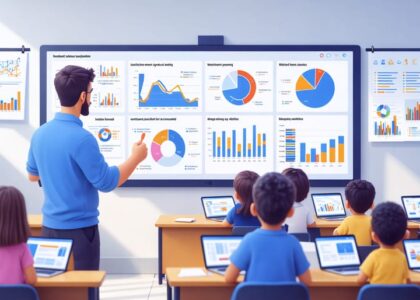
Real-time learning revolutionizes classroom dynamics by delivering instant feedback that transforms how students absorb and apply knowledge. Through predictive analytics in education, teachers now harness data-driven insights to adjust instruction the moment learning gaps emerge. This immediate response system creates a dynamic educational environment where students receive personalized guidance precisely when they need it most, rather than waiting for traditional assessment periods.
The power of real-time learning lies in its ability to create an adaptive learning ecosystem where every student interaction becomes a meaningful teaching opportunity. By monitoring student progress continuously, educators can identify struggling learners before they fall behind and challenge advanced students without waiting for the next lesson plan. This revolutionary approach bridges the gap between instruction and understanding, ensuring that no student gets left behind while maintaining the pace of curriculum delivery.
As classrooms become increasingly digital, real-time learning systems offer the unprecedented ability to track, analyze, and respond to student performance instantaneously. This transformation empowers teachers to make evidence-based decisions that optimize learning outcomes for every student, creating a more inclusive and effective educational experience.
How Real-Time Learning Feedback Works
Key Components of Real-Time Feedback
Real-time feedback in education relies on three key components working together seamlessly. First, continuous data collection captures student interactions, responses, and progress through digital learning platforms and classroom activities. This includes everything from quiz responses to participation patterns and engagement metrics.
The second component involves robust student performance analytics tools that process this collected data. These tools transform raw information into meaningful insights, helping teachers identify learning gaps, track progress, and spot trends in student performance. Modern analytics platforms can process multiple data points simultaneously, providing a comprehensive view of student learning.
The final component is the response mechanism, which delivers timely feedback to both students and teachers. This can take various forms, from automated responses in digital learning platforms to teacher-initiated interventions based on real-time data. Effective response systems should be:
– Immediate and relevant
– Personalized to student needs
– Clear and actionable
– Encouraging and constructive
When these components work together effectively, they create a dynamic learning environment that supports continuous improvement and personalized learning experiences.

Integration with Classroom Technology
Real-time learning systems seamlessly integrate with many popular classroom technology platforms, making implementation straightforward for most educators. Common learning management systems (LMS) like Google Classroom, Canvas, and Schoology now feature built-in real-time assessment capabilities that work alongside existing digital resources.
These integrations allow teachers to maintain their current digital workflow while adding real-time feedback features. For example, interactive presentations can include embedded questions that provide immediate responses, while digital worksheets can automatically track student progress as they work. Many platforms also offer browser extensions that enable real-time monitoring across various educational websites and applications.
Most systems support single sign-on (SSO) authentication, meaning students and teachers can access real-time learning tools using their existing school credentials. Data synchronization ensures that assessment results automatically populate gradebooks and student progress reports, saving valuable time for educators.
Mobile device compatibility is another key feature, allowing students to participate in real-time learning activities using tablets or smartphones when computers aren’t available. This flexibility ensures that technology limitations don’t prevent access to immediate feedback and interactive learning experiences.
Practical Implementation Strategies
Setting Up Your System
Getting started with real-time learning tools doesn’t have to be overwhelming. Begin by assessing your classroom’s current technology infrastructure, including internet connectivity and student devices. Most schools already have the basic requirements in place: a reliable internet connection and devices that can access web-based applications.
Next, choose a primary platform that aligns with your teaching style and student needs. Popular options include learning management systems with built-in feedback features or specialized real-time assessment tools. Many of these platforms offer free trials, allowing you to test their functionality before making a commitment.
Ensure your students have individual login credentials and understand how to access the platform. Consider creating a simple guide or conducting a brief training session to familiarize them with the basic features. It’s helpful to start with one or two key functions rather than implementing all features at once.
Set up your digital classroom space by organizing content into clear categories or units. Create a test lesson or assessment to practice using the system yourself before introducing it to students. This allows you to identify potential challenges and develop solutions proactively.
Remember to check your school’s data privacy policies and ensure your chosen platform complies with necessary educational regulations. Many platforms offer specific settings for K-12 environments, which can help maintain appropriate security measures while facilitating effective real-time learning interactions.

Best Practices for Daily Use
To maximize the benefits of real-time learning in your classroom, establish clear routines and expectations from the start. Begin by dedicating the first few minutes of each class to reviewing previous feedback and setting learning goals for the day. This creates a foundation for meaningful engagement and helps students understand the purpose of real-time assessments.
Incorporate regular check-in points throughout your lessons. These can be as simple as quick thumbs-up/thumbs-down signals or short digital polls. The key is maintaining consistency while being flexible enough to adjust based on student responses. Remember that not every moment needs to be assessed – focus on critical learning points where immediate feedback will have the most impact.
Create a supportive environment where students feel comfortable sharing their understanding. Encourage peer-to-peer feedback and self-reflection as part of the process. Consider using a mix of individual and group responses to maintain engagement and provide multiple perspectives on learning progress.
Keep your feedback specific, actionable, and timely. When students struggle, offer targeted support immediately rather than waiting until the end of the lesson. Celebrate progress and use mistakes as learning opportunities. Document significant patterns in student responses to inform your future lesson planning and differentiation strategies.
Finally, regularly reflect on your implementation. What’s working well? Where could adjustments be made? Share successful strategies with colleagues and remain open to new approaches that might enhance your real-time learning practice.
Benefits for Teachers and Students
Enhanced Student Engagement
Real-time learning transforms traditional classroom dynamics by creating an environment where students actively participate in their educational journey. When students receive immediate feedback on their work, they become more engaged and invested in the learning process. This instant response system creates a dynamic loop of interaction that keeps students focused and motivated.
Teachers who implement real-time feedback tools report significant improvements in classroom participation. Students feel more confident contributing to discussions when they know they’ll receive immediate guidance and support. This approach to data-driven student success allows educators to identify and address misconceptions as they occur, preventing the formation of incorrect understanding that might otherwise persist.
The immediate nature of real-time feedback also helps maintain student momentum. Rather than waiting days or weeks for assessment results, learners can adjust their approach instantly, leading to better retention and understanding. This continuous engagement creates a more collaborative learning environment where students feel supported and empowered to take risks in their learning.
Interactive polling, digital response systems, and collaborative platforms have made it easier than ever to implement real-time feedback strategies. These tools not only enhance student participation but also provide valuable insights into learning patterns, allowing teachers to adapt their instruction methods on the fly and ensure no student falls behind.

Improved Teaching Efficiency
Real-time learning technology significantly enhances teaching efficiency by providing educators with immediate insights into student progress and engagement. Teachers can now monitor student understanding during lessons, allowing for swift adjustments to instruction based on learning analytics insights rather than waiting for traditional assessment results.
This dynamic approach enables teachers to identify struggling students instantly and offer targeted support when it’s most effective. For example, when multiple students show confusion about a specific concept, teachers can pause and clarify immediately rather than discovering this gap days or weeks later through homework or tests.
The technology also streamlines assessment processes, reducing the time spent on grading and data analysis. Automated scoring and progress tracking free up valuable time that teachers can reinvest in lesson planning, individualized student support, and professional development.
Furthermore, these tools help teachers maintain better documentation of student progress, making it easier to communicate with parents and administrators about student achievement. The ability to generate comprehensive progress reports automatically helps educators focus more on teaching and less on administrative tasks.
By providing real-time feedback on teaching effectiveness, these systems also help educators refine their instructional strategies continuously. This iterative improvement process leads to more engaging and effective lessons, ultimately benefiting both teachers and students.
Overcoming Common Challenges
Technical Considerations
When implementing real-time learning systems, several technical considerations need attention to ensure smooth operation. A stable internet connection is essential, as intermittent connectivity can disrupt the learning flow. Consider having a backup plan, such as offline activities or downloadable content, for times when technical issues arise.
Device compatibility is another crucial factor. Ensure that your chosen real-time learning tools work across different devices and operating systems. Many students may use tablets or smartphones rather than computers, so mobile-friendly platforms are vital.
Storage and data management also require careful planning. Real-time feedback generates significant data, which needs secure storage and organized access. Regular system updates and maintenance help prevent technical glitches and ensure data security.
Audio and video quality significantly impact real-time learning experiences. Test your equipment beforehand and guide students on optimal setup for their devices. Consider bandwidth limitations when planning multimedia activities, and have alternatives ready for students with connectivity constraints.
Remember to provide clear technical support resources and step-by-step guides for both teachers and students. This proactive approach minimizes disruptions and helps maintain focus on learning rather than troubleshooting.
Student Adaptation Support
Transitioning students to real-time learning systems requires a thoughtful and gradual approach. Start by introducing the concept through brief, low-stakes activities that allow students to experience immediate feedback without feeling overwhelmed. Create a supportive classroom environment where mistakes are viewed as learning opportunities rather than failures.
Develop clear guidelines and expectations for using the real-time feedback tools, and provide step-by-step tutorials that students can reference independently. Consider implementing a buddy system where tech-savvy students can assist peers who may need additional support. This peer-to-peer learning approach builds confidence and promotes collaboration.
Regular check-ins with students about their comfort level and challenges with the system help identify areas where additional support may be needed. Customize the pace of implementation based on individual student needs, and offer alternative methods for students who may temporarily struggle with the digital interface.
Remember to celebrate small wins and progress, helping students recognize how real-time feedback contributes to their learning journey. Create opportunities for students to share their experiences and strategies, fostering a community of learners who support each other’s growth and adaptation to this new learning approach.
Real-time learning represents a transformative approach to education that can significantly enhance student engagement and achievement. By implementing the strategies and tools discussed throughout this article, you can create a more dynamic and responsive learning environment that meets the diverse needs of your students.
Remember that successful implementation of real-time learning doesn’t require an immediate overhaul of your teaching methods. Start small by incorporating one or two feedback techniques into your daily lessons. You might begin with simple exit tickets or digital polling tools, then gradually expand to more comprehensive real-time assessment strategies as your comfort level grows.
The key to success lies in maintaining open communication with your students, being flexible in your approach, and consistently gathering and acting on feedback. Don’t be afraid to adjust your methods based on what works best for your specific classroom community.
As you move forward, connect with fellow educators who are also implementing real-time learning strategies. Share your experiences, challenges, and successes through professional learning communities and educational forums. The collective wisdom of educators working together can lead to innovative solutions and improved practices.
Remember, real-time learning is not just about technology – it’s about creating meaningful connections and ensuring every student has the opportunity to succeed. By embracing these practices, you’re taking an important step toward more effective, inclusive, and engaging education for all learners.
Take the first step today. Your students will benefit from your commitment to responsive, real-time learning, and you’ll likely find yourself becoming a more effective and fulfilled educator in the process.